House Manual
Welcome to Rep84. This guide helps you make the most of your stay.
Boiler — seasonal settings
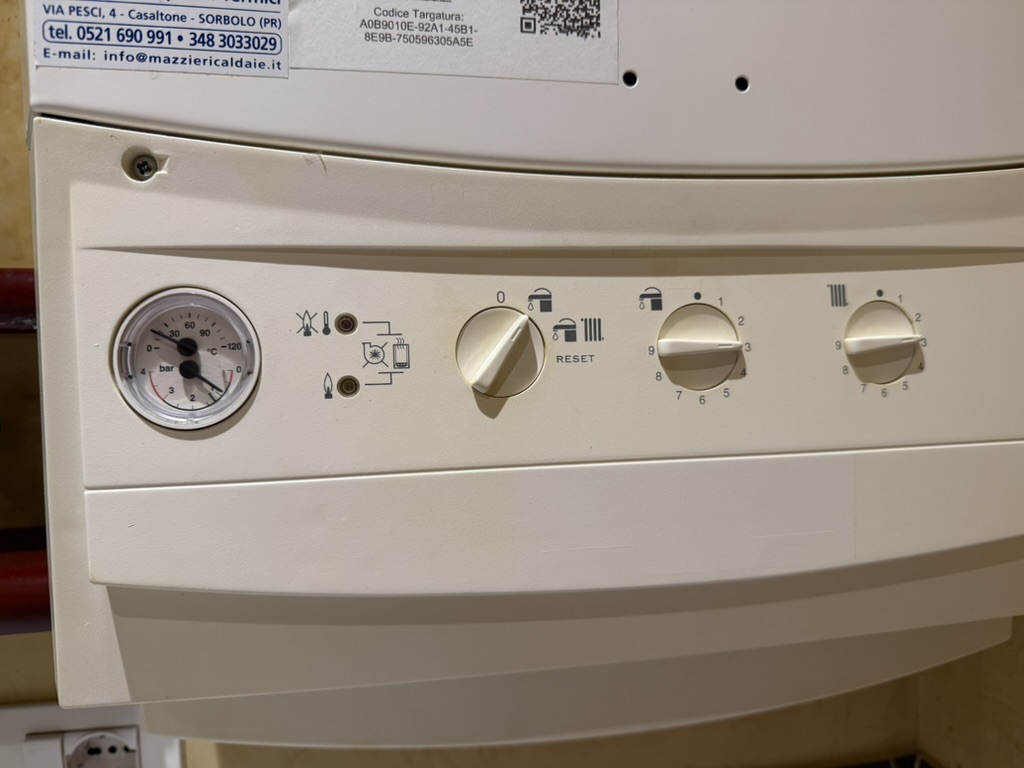
In summer, set the boiler to Solo Rubinetto (tap only), as in the photo — this supplies domestic hot water.
In winter, set it to Rubinetto + Calorifero (tap + radiator).
Dial positions from 1 to 9 set heating intensity.
Power Outage
If the power goes out, follow these three steps in order:
1) Check the indoor electrical panel (entrance area, to the left of the entrance door)
Open the panel and verify that all differential switches are in the UP position. If any have tripped down, flip them back up.
2) Check the outdoor meter (Enel)
The meters are in a wooden cabinet on the external wall of the ground floor.
Open the cabinet and locate the meter labelled «PIRAS» or «REP84».
If the blue switch has tripped down, flip it back up.
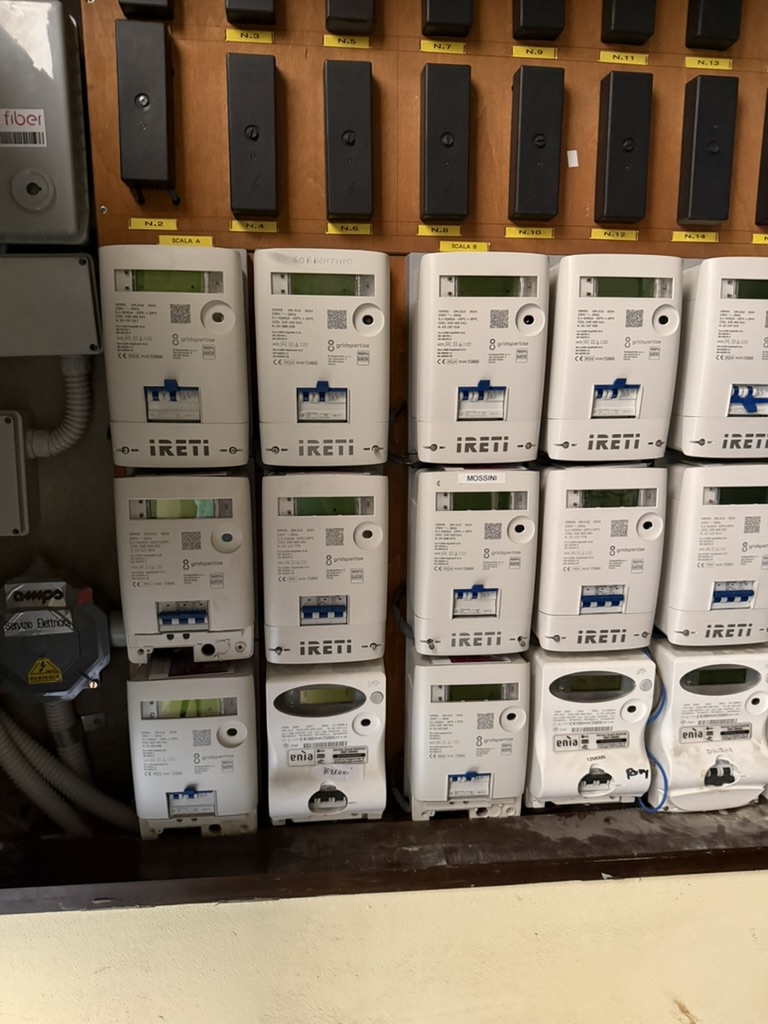
3) Check the additional differential switch at the bottom of the outdoor panel
In the lower part of the outdoor meter cabinet there is a third differential switch. Verify that it is also in the UP position and reset it if needed.
If a switch trips again immediately after resetting, unplug the last appliance you used and try again. If the problem persists, contact us immediately.
WiFi Connection
Network name: VodafoneRep84
Password: GreatScott88!
The router is located in the living room. If the connection drops, unplug the router, wait 10 seconds, and plug it back in.
Heating and Air Conditioning
The apartment has a split air conditioning system that provides both heating and cooling.
Use the remote control located on the wall near the entrance.
For cooling: press the COOL button and set your desired temperature (we recommend 24-25 C).
For heating: press the HEAT button and set your desired temperature (we recommend 20-22 C).
Please turn off the AC when you leave the apartment to save energy.
Hot Water
Hot water is provided by an electric boiler. It takes a few seconds for the water to reach the desired temperature.
If there is no hot water, check that the boiler switch is ON (located in the bathroom).
Kitchen Appliances
Coffee Machine
Nespresso-compatible capsule machine. Insert a capsule, place your cup, and press the button. Capsules are provided as a welcome gift.
Induction Cooktop
Touch the ON/OFF button, select the zone, and adjust the power level. Only use cookware with a magnetic base.
Microwave
Set the time and power using the dial. Do not use metal containers.
Washing Machine
Located in the bathroom. Add detergent in the drawer, select the program (we recommend 30 C for everyday clothes), and press Start.
TV and Projector
The apartment is equipped with a projector connected to a Google TV device.
Turn on the projector using the remote control (power button on top).
The Google TV interface will appear. You can use RaiPlay for free or log into your own Netflix, Disney+, or other accounts.
Remember to log out of your streaming accounts before checkout.
Keys and Door Lock
You will receive a set of keys for the front door and the parking gate.
The front door has a double lock: turn the key twice to lock and twice to unlock.
Please always lock the door when leaving the apartment.
Trash and Recycling
Parma has a door-to-door waste collection system. Please separate your waste:
Organic waste (brown bin)
Paper and cardboard (blue bin)
Plastic and cans (yellow bin)
Glass (green bin)
Non-recyclable waste (grey bin)
Leave bags outside the front door on the evening before collection day. Ask us for the current collection schedule.
Troubleshooting
Power outage
Check the main electrical panel (located near the entrance). If a switch has tripped, flip it back up. If it trips again, unplug the last appliance you used and try again.
No hot water
Make sure the boiler switch is ON. If it still does not work, wait 30 minutes for the water to heat up.
WiFi not working
Restart the router by unplugging it for 10 seconds. If the problem persists, contact us.
AC not working
Check that the remote has batteries. Make sure the unit is set to the correct mode (COOL/HEAT). If it still does not work, contact us.
Projector not turning on
Check that the projector is plugged in. Try pressing the power button on the projector itself.
Emergency Contacts
Host (Fausto): +39 379 335 0984
General Emergency (Italy): 112
If you have any issue, do not hesitate to contact us. We are here to make your stay perfect.